Effects Framework
Status: This specification is in progress. Please feel free to edit this page and add your comments.
DJs often augment their mixes with effects. Mixxx is severely lacking in this department, as released versions of Mixxx only offer EQs and a flanger.
This project aims to bring effects to Mixxx, both via native effects and effects plugins via LADSPA, LV2, or VST.
This project is active and the initial version is slated for release in Mixxx 1.12.0. It is not 100% feature-complete as per this design. The code is available in the features_effects branch on rryan's github
The goal is that the DJ can enhance her performance through the use of audio effects. To present this in a simple-to-use and powerful way, we introduce the metaphor of "Effect Chains". An effect chain is nothing more than a list of effects which are applied sequentially to audio. An effect chain can be applied to decks, samplers, microphones, aux inputs, the headphone out, and the master output.
The DJ configures effect chains by selecting effects that are available to her from any variety of effect sources (native built-in plugins, LADSPA plugins, LV2 plugins, VST plugins, etc.) and adding them to the chain. She does this from a view called "Effect Chain Edit Mode" that takes the place of where the Mixxx library normally sits.
Once the DJ has selected the effects that she desires to be in the chain, then the parameters of that effect are made available to her to tweak to her liking. Each parameter can be adjusted in the following ways:
- Change the value of the parameter
- Change the minimum / maximum limits of the parameter
- Invert the knob so that turning it clockwise goes from high to low instead of low to high.
- In the case of a knob, change whether the parameter is controlled linearly or logarithmically
- Assign the parameter to be controlled by the effect chain's "Wonder Knob". See the "Wonder Knob" section below.
Once the DJ is done configuring the effect chain and the parameters of the effects that are in the effect chain, she may save the effect chain and give it a name.
The key idea here is that the DJ should invest time in crafting and creating the unique sounds she would like to make via Effect Chains prior to her sets. While it will be possible to create Effect Chains on the fly, it will be a lot less stressful if she has invested the time beforehand.
TODO: Insert marketing name here :) Candidates: SuperKnob, WonderKnob, MetaKnob, HyperKnob, AwesomeKnob, FunkyKnob, MagicKnob
Every effect chain has a single knob called the "Wonder Knob". This knob is meant to be the go-to knob for the DJ to tweak during her set to make awesome effect noises happen. If you look at a lot of Ean Golden's videos on DJTechTools, this is how many of his combinations of effects work. There is one knob to turn that produces the desired effect. This is both a huge usability win (no knob soup) and allows the DJ to focus on what she is doing. As previously outlined, when creating an effect chain in Chain Edit Mode, the DJ can link one or more of each effect's parameters to the chain's "Wonder Knob". This, combined with with the ability to tweak the min/max ranges, and the linear/log settings of the knobs, allows the DJ to create one knob that does the work of what she would normally do by tweaking multiple knobs simultaneously.
One benefit of having a "Wonder Knob" is that it maps very naturally to many MIDI controllers, which often have a limited number of knobs available for tweaking effets. One example of this is the Numark V7/NS7, which only has a single effect-selector knob and an effect-parameter knob. In this case, we would make the effect selector knob select the active effect chain, and the effect-parameter knob tweak the "Wonder Knob". In ITCH, the V7/NS6/NS7FX are limited to only a single effect at a time, and these knobs are designed to reflect that. By mapping this knob to effect chains, we will allow NS7/V7 owners to achieve a categorically more flexible effect setup.
- A general EffectManifest interface which allows each effect to express:
- The effect name (internationalizable)
- A description of the effect (internationalizable)
- The parameters each effect has, including:
    * An internal identifier
    * A version number
    * A human-readable name (internationalizable)
    * A prose description, with support for internationalization, suitable for display in a tooltip. (internationalizable)
    * Units and maximum/minimum/default values of the parameter
* A preferred ordering of parameters in order of importance
* Backend
* Support for multiple backends (plugin based or not)
* A reference implementation of a Mixxx-internal effects backend
    * Support for at least a flanger
* Effect Instances (known as "Effect")
* Support the customization of parameter ranges to a subset of the EffectManifest's min/max ranges
* Support linking of individual parameters to the Effect Chain's meta-knob.
    * Support different types and shapes of linkages: linear, logarithmic, inverse, inverse-log, etc.
* **QUESTION: Each effect shall have an individual wet/dry parameter? Currently all effects are fully wet and the chain has a wet/dry knob.**
* Effect Chains
* Support chaining multiple Effects together into an Effect Chain.
* Each chain has:
    * An enabled property
    * A list of audio groups for which the chain is enabled (e.g. samplers, decks, microphone, master out, headphone out)
    * A wet/dry parameter.
    * A superknob which individual parameters of effects link to.
* Effect Racks (EffectChain "presets")
* A Rack is a set of active Effect Chains.
* an Effect Rack has
    * a name
    * an author
    * a list of EffectChains and their presets
* Mixxx 1.12.0 will come with 1 effect rack. The rack will have 4 effect chain slots.
* Support loading and saving an effect rack to XML.
    * XML must contain definitions of the Effects and the EffectChains in the rack.
* Support clearing the current rack with 1 button.
* Support loading a rack from a drop-down list of rack names.
* Control (MIDI, Keyboard, GUI, etc) Interface
* MIDI scripts must be able to control loaded effectchain parameters
* MIDI scripts must be able to request that an effect chain be ejected or a next/previous effect chain be loaded. (support effect knobs on e.g. NS7)
* MIDI scripts must be able to observe effect chains and make changes.
* MIDI scripts must have a simple-mode by which they can treat parameters as 0.0 - 1.0 values so they do not have to deal with the complexity of min/max values, types, etc.
* GUI Widgets and Groups
* EffectChain widget group
    * A group of widgets that represent an EffectChain loaded in an EffectRack's slot.
    * Show selected EffectChain name
    * SuperKnob Parameter Knob
    * Channel Select buttons (Deck 1, Deck 2, PFL, Master?)
    * Enable Button or wet/dry knob? Disabled is same as wet == 0.
    * Advanced button -- rolls down a section with multiple parameter knobs.
* EffectChain Advanced widget group
    * **Same as EffectChain widget group but taller.**
    * Includes a row of parameter knobs for tweaking the parameters of the first effect in the chain.
    * **TODO: Find a way to let the effect chain editor pick which parameters of all in the chain to show in advanced view?**
    * Include parameter name next to each parameter knob.
* EffectParameterNameWidget
    * For showing the parameter name.
* EffectChainNameWidget
    * For showing the EffectChain name.
* EffectChain Editor Library section
    * See existing chain presets
    * Create new preset
    * Add/remove effect to existing chain
    * Change value of parameter of effect in slot
    * Right-click hover overlay for tweaking ranges, defaults.
The properties of an effect are described by an EffectManifest object. An EffectManifest is an immutable data type (should always be const) that fully describes all of the effect's properties that are relevant to user-facing aspects of effects. This includes a description of each user-facing parameter of each effect, along with metadata describing hints for how the parameter should be presented to the user, limits of the parameter's values, and default values for the parameter. An EffectManifest is strictly an abstract description of the effect, and has nothing to do with an actual instantiation of an effect. An Effect object is an instantiation of an EffectManifest, and manages actual instance values for each parameter described in the EffectManifest.
| EffectManifest Properties | |
|---|---|
| Property | Description |
| name | Effect name (internationalizable) |
| author | Author name |
| version | Effect version (string) |
| description | Effect description (internationalizable) |
| parameters | A list of EffectParameter objects, describing user-facing parameters |
| EffectParameter Properties | |
|---|---|
| Property | Description |
| name | Effect name (internationalizable) |
| description | Effect description (internationalizable) |
| defaultValue | Parameter's default value |
| minimumValue | Parameter's minimum value, if any |
| maximumValue | Parameter's maximum value, if any |
| valueHint | A hint describing the type of the parameter's value (boolean, float, integer, etc.) |
| controlHint | A hint describing the most logical control type for the parameter (potmeter, log-potmeter, toggle, slider, etc.) |
| semanticHint | A hint describing the semantic type of the value (pitch, samples, time, duration) |
| unitsHint | A hint describing the units of the value (time, hertz, fraction of samplerate) |
| linkHint | A hint describing the default linking of the parameter to the super-parameters |
NOTE: The hints are still under development. Please give feedback!
More info at: EffectParameter Scaling
The effects system will implement a backend model similar to Mixxx's MIDI backend. Multiple backends will provide Effects that are aggregated by an EffectsManager class. Each backend will provide effects either loaded from a plugin system such as LADSPA, LV2, or VST. Alternatively, a backend can implement effects natively and expose them via the same Effect interface used by the plugin-based backends.
Given an Effect instance, a buffer of audio can be processed given the parameter settings in the instance.
The EffectsManager uses the EffectsBackends to instantiate Effects from EffectManifests. Once the EffectsManager instantiates an Effect, it is able to ask the Effect to process a buffer of audio.
An EffectSlot is an abstraction over an Effect. It provides a ControlObject interface for controlling the parameters of an Effect. To a user, an EffectSlot is the equivalent of a "selected" effect. Knobs in the GUI and MIDI controllers connect to the EffectSlot's controls, which in turn are used to control the Effect that is loaded into the slot. Similarly, an EffectChainSlot is an abstraction over an EffectChain. It provides a ControlObject interface to controlling an EffectChain that is loaded into it. To a user, an EffectChainSlot is an "effect unit" which is a chain of EffectSlots.
One or more EffectSlots are grouped into an EffectChainSlot. The EngineMaster and EngineChannels interact with the effects framework at the level of EffectChains. Every EffectChain is conditionally applied to multiple EngineChannel's (e.g. [Channel1], [Channel2], [Sampler1], etc). In addition to EngineChannels, EffectChains are conditionally applied to both the EngineMaster master output ([Master]) and the headphone output ([Headphone]).
EffectChainSlots and EffectSlots both provide a ControlObject interface
for both the GUI and MIDI controllers to interact with. At creation
time, all EffectChainSlots are assigned a sequential, unique ID starting
at 1. All EffectChainsSlots have the group [EffectRack1_EffectUnitN]
where N is the EffectChain's ID.
| | EffectRack Controls | | | | | | | | | | ------------------------------------- | | ---------------------------- | | -------------------- | | -------------------------------------------------------------------------------------------------------------------------- | | | | [Group] | | Key/Control | | Range | | What it does | | | | [EffectRack1] | | num_effectunits | | integer, read-only | | The number of EffectUnits in this rack | | | | EffectUnit Controls | | | | | | | | | | [Group] | | Key/Control | | Range | | What it does | | | | [EffectRack1_EffectUnitN] | | num_effects | | integer, read-only | | The number of Effects that this EffectChain has | | | | [EffectRack1_EffectUnitN] | | num_effectslots | | integer, read-only | | The number of effect slots available in this EffectUnit. | | | | [EffectRack1_EffectUnitN] | | mix | | 0.0..1.0 | | The dry/wet mixing ratio for this EffectChain with the EngineChannels it is mixed with | | | | [EffectRack1_EffectUnitN] | | loaded | | binary, read-only | | Whether an EffectChain is loaded into the EffectUnit | | | | [EffectRack1_EffectUnitN] | | enabled | | binary, default true | | If true, the EffectChain in this EffectUnit will be processed. Meant to allow the user a quick toggle for the effect unit. | | | | [EffectRack1_EffectUnitN] | | super1 | | 0.0..1.0 | | The EffectChain super parameter knob. Controls all effect parameters that are linked to the chain's super knob. | | | | [EffectRack1_EffectUnitN] | | clear | | binary | | Clear the currently loaded EffectChain in this EffectUnit. | | | | [EffectRack1_EffectUnitN] | | next_chain | | binary | | Cycle to the next EffectChain preset after the currently loaded preset. | | | | [EffectRack1_EffectUnitN] | | prev_chain | | binary | | Cycle to the previous EffectChain preset before the currently loaded preset. | | | | [EffectRack1_EffectUnitN] | | chain_selector | | +1/-1 | | Select EffectChain preset -- >0 goes one forward, <0 goes one backward. | | | | [EffectRack1_EffectUnitN] | | group_[ChannelI]_enable | | binary | | Whether or not this EffectChain applies to Deck I | | | | [EffectRack1_EffectUnitN] | | group_[SamplerJ]_enable | | binary | | Whether or not this EffectChain applies to Sampler J | | | | [EffectRack1_EffectUnitN] | | group_[Master]_enable | | binary | | Whether or not this EffectChain applies to the Master output | | | | [EffectRack1_EffectUnitN] | | group_[Headphone]_enable | | binary | | Whether or not this EffectChain applies to the Headphone output | | | | Effect Controls | | | | | | | | | | [Group] | | Key/Control | | Range | | What it does | | | | [EffectRack1_EffectUnitN_EffectM] | | loaded | | binary, read-only | | Whether an Effect is loaded into this EffectSlot | | | | [EffectRack1_EffectUnitN_EffectM] | | enabled | | binary, default true | | If true, the effect in this slot will be processed. Meant to allow the user a quick toggle for this effect. | | | | [EffectRack1_EffectUnitN_EffectM] | | clear | | binary | | Clear the currently loaded Effect in this Effect slot from the EffectUnit. | | | | [EffectRack1_EffectUnitN_EffectM] | | next_effect | | binary | | Cycle to the next effect after the currently loaded effect. | | | | [EffectRack1_EffectUnitN_EffectM] | | prev_effect | | binary | | Cycle to the previous effect before the currently loaded effect. | | | | [EffectRack1_EffectUnitN_EffectM] | | effect_selector | | +1/-1 | | Select Effect -- >0 goes one forward, <0 goes one backward. | | | | [EffectRack1_EffectUnitN_EffectM] | | num_parameters | | integer, read-only | | The number of parameters the currently loaded effect has. 0 if no effect is loaded | | | | [EffectRack1_EffectUnitN_EffectM] | | num_parameterslots | | integer, read-only | | The number of parameter slots available. | | | | [EffectRack1_EffectUnitN_EffectM] | | num_button_parameters | | integer, read-only | | The number of button parameters the currently loaded effect has. 0 if no effect is loaded | | | | [EffectRack1_EffectUnitN_EffectM] | | num_button_parameterslots | | integer, read-only | | The number of button parameter slots available. | | | | EffectParameter Controls | | | | | | | | | | [Group] | | Key/Control | | Range | | What it does | | | | [EffectRack1_EffectUnitN_EffectM] | | parameterK | | double | | The scaled value of the Kth parameter. See the Parameter Values section for more information. | | | | [EffectRack1_EffectUnitN_EffectM] | | parameterK_loaded | | binary, read-only | | Whether or not the Kth parameter slot has an effect parameter loaded into it. | | | | [EffectRack1_EffectUnitN_EffectM] | | parameterK_link_type | | enum | | The link type of the Kth parameter to the EffectChain's superknob. | | | | [EffectRack1_EffectUnitN_EffectM] | | parameterK_link_inverse | | bool | | The link direction of the Kth parameter to the EffectChain's superknob. | | | | [EffectRack1_EffectUnitN_EffectM] | | parameterK_type | | integer, read-only | | The type of the Kth parameter value. See the Parameter Value Types table. | | | | [EffectRack1_EffectUnitN_EffectM] | | button_parameterK | | double | | The value of the Kth parameter. See the Parameter Values section for more information. | | | | [EffectRack1_EffectUnitN_EffectM] | | button_parameterK_loaded | | binary, read-only | | Whether or not the Kth parameter slot has an effect parameter loaded into it. | | | | [EffectRack1_EffectUnitN_EffectM] | | button_parameterK_type | | integer, read-only | | The type of the Kth parameter value. See the Parameter Value Types table. | |
In the above table,
- EffectRack1 leaves room for future expansion to multiple EffectRacks.
- N ranges from 1 to [EffectRack1],num_effectunits, inclusive.
- M ranges from 1 to [EffectRack1_EffectUnitN],num_effectslots, inclusive. (For a given value of N)
- K ranges from 1 to [EffectRack1_EffectUnitN_EffectM],num_parameters, inclusive. (For given values of N and M)
- I ranges from 1 to [Master],num_decks, inclusive.
- J ranges from 1 to [Master],num_samplers, inclusive.
NOTE: The reason for 1-indexing versus 0-indexing is the significant precedent within the Control system for 1-indexing. (e.g. hotcues, Deck/Sampler names, etc.)
Since the Control system is not capable of representing values other than numeric values, for the first iteration of the effects system, we must use a numeric coding system for representing the parameter types. If the MIDI Script author does not care about choosing correct values, he or she can use setParameter() which represents the parameter value as normalized to the range of 0.0 to 1.0.
| Parameter Value Type | Integer Value | Intepretation |
|---|---|---|
| Boolean | 0 | Set only to values of 0 (false) or 1 (true) |
| Integer | 1 | Set to any integral value |
| Double | 2 | Set to any double value. |
Effect parameters can be linked to their EffectChain's super-parameters.
This linkage can be user-controlled by changing the link_type and the
link_inverse control of the EffectParameter slot. The default link
type is loaded from the effect parameter's manifest's linkHint
property.
| Link Type | Integer Value | Intepretation |
|---|---|---|
| None | 0 | Not controlled by the super knob |
| Linked | 1 | Controlled by the super knob as it is |
| Linked Left | 2 | Controlled by the left side of the super knob |
| Linked Right | 3 | Controlled by the right side of the super knob |
| Linked Left Right | 4 | Controlled by both sides of the super knob |
| Link Inverse | Integer Value | Intepretation |
|---|---|---|
| Normal | 0 | Linked in equal relation |
| Inverse | 1 | Linked in an inverse relation. |
Brainstorming for now. Basing heavily off of Jus's mockups from Summer 2010: Effects Units Mockup Effects Units Editor Mockup
Mockup of Effect-Chain Compact Interface. Only MetaKnobs are showing.

TODO: Need to formalize what "Fit" means. In general, a fit is good if it matches the paradigm of effect-chains being
- Selectable (usually with an FX select knob or button)
- Controllable via 1 single parameter (usually a knob)
- Allow selection of Decks that an effect-chain applies to either directly in the effects section or in the mixer section.
- Optionally, enable via on/off button
- Optionally, a wet/dry effect mix knob
| Controller | Effects? | Settings | Fit? |
|---|---|---|---|
| American Audio VMS4 | Y | Per-deck effect-select knob, effect parameter knob, effect enable button, parameter toggle button? | Good |
| Behringer BCD3000 | Y | 4-effect parameter knobs plus on/off button, FX select up/down buttons, and "action" button | Good |
| Denon DN-MC6000 | Y | Per-deck 4-effect parameter knob plus on/off button. Per-deck FX select for FX unit 1 and 2 | Good |
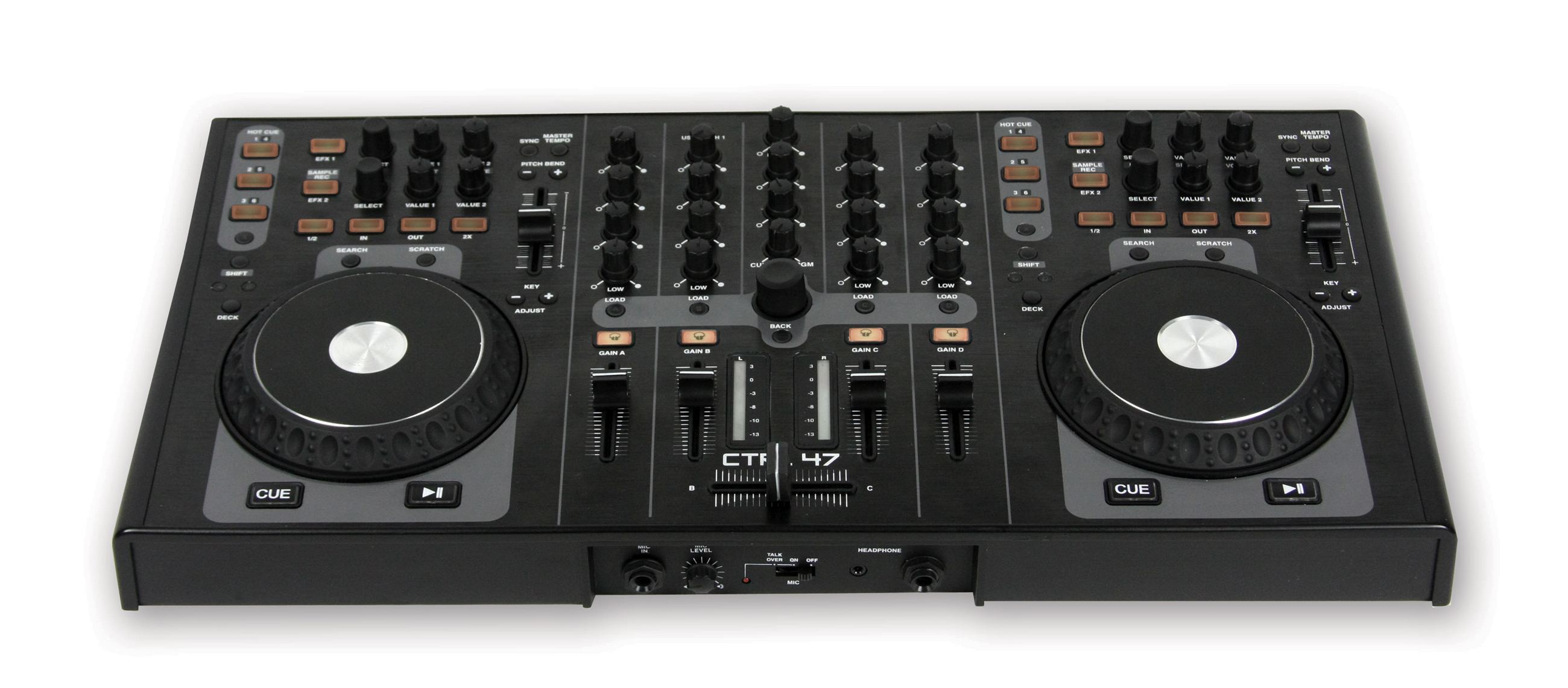
| Gemini CTRL-47 | Y | Per-deck 2 effects controls. Each control has FX select and 2 parameter knobs plus on/off button. | Good |
| Hercules DJ Console RMX | N | N/A | |
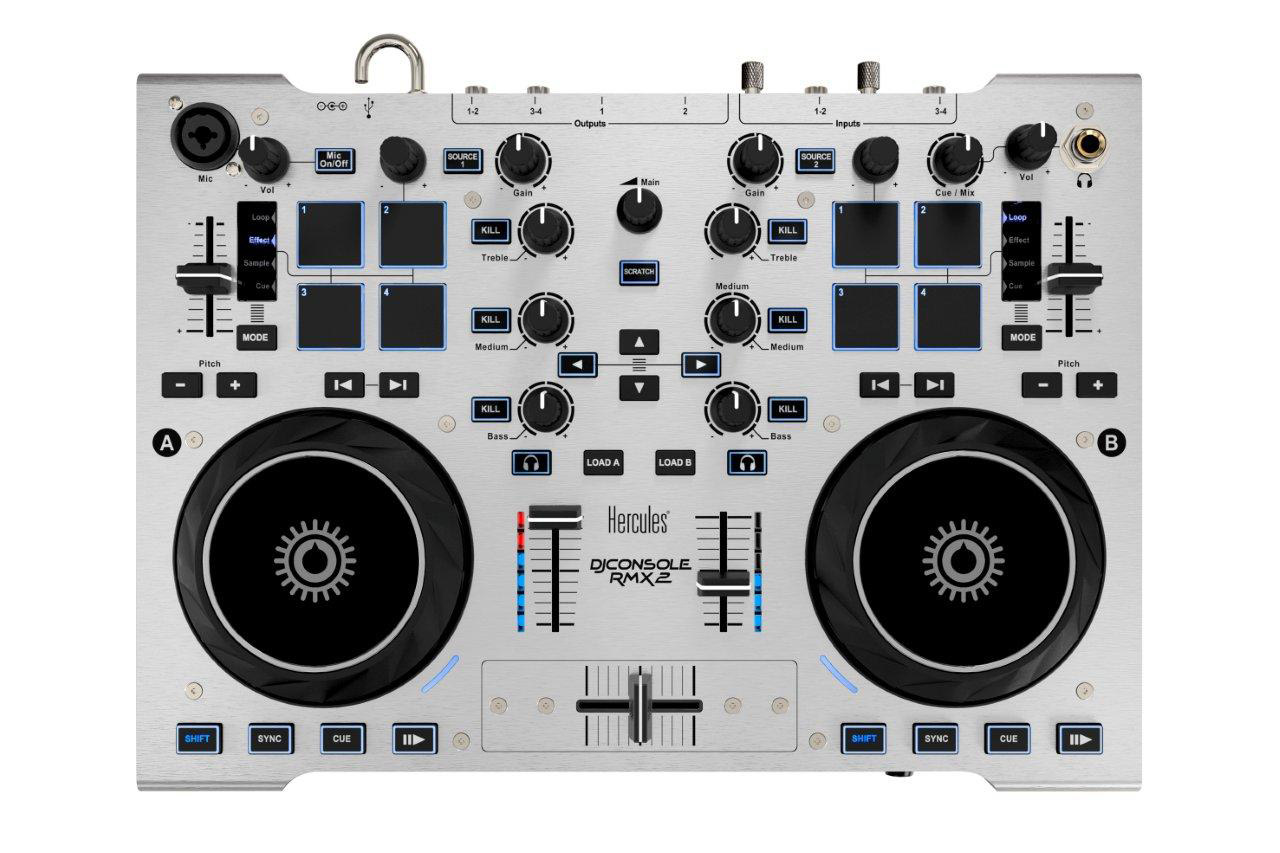
| Hercules DJ Console RMX2 | Y | Four preasure senitive buttons, one endless wheel knop | Good |
| Hercules DJ Console 4MX | N | N/A | |
| Hercules DJ 4set | N | N/A | |
| Hercules DJ Console Mk4 | N | N/A | |
| Hercules DJ Control Steel | N | N/A | |
| Hercules DJ Control MP3 e2 | N | N/A | |
| M-Audio Torq Xponent | Y | 4 effect parameter knob + 4 enabled buttons per deck | Medium |
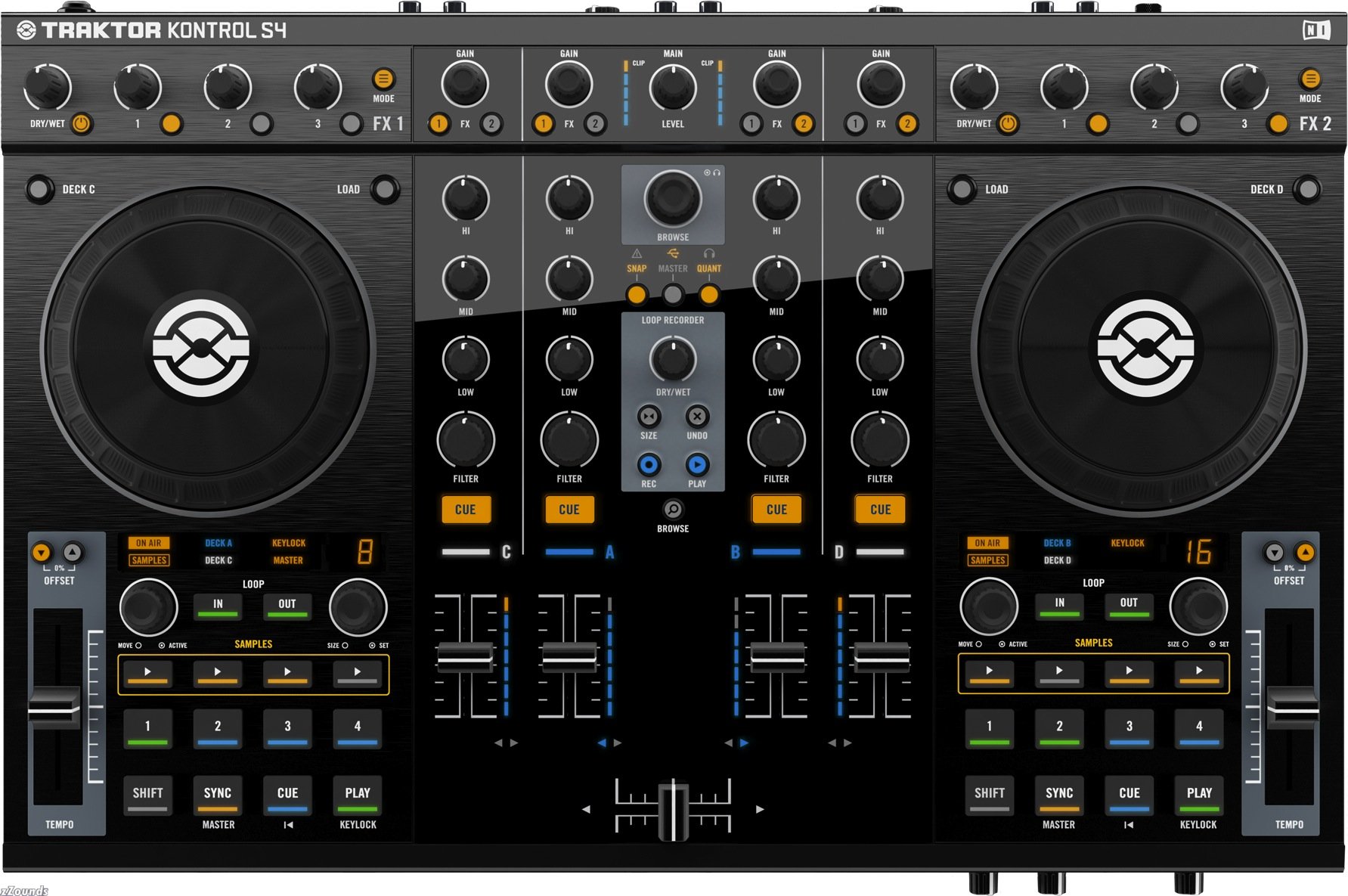
| NI Traktor Kontrol S4 | Y | Per chain: 1 dry/wet knob, 3 effect parameter knobs, 1 chain on/off button, 3 effect option buttons, menu button (?). Per-deck effect chain (2x) enable buttons | Good |
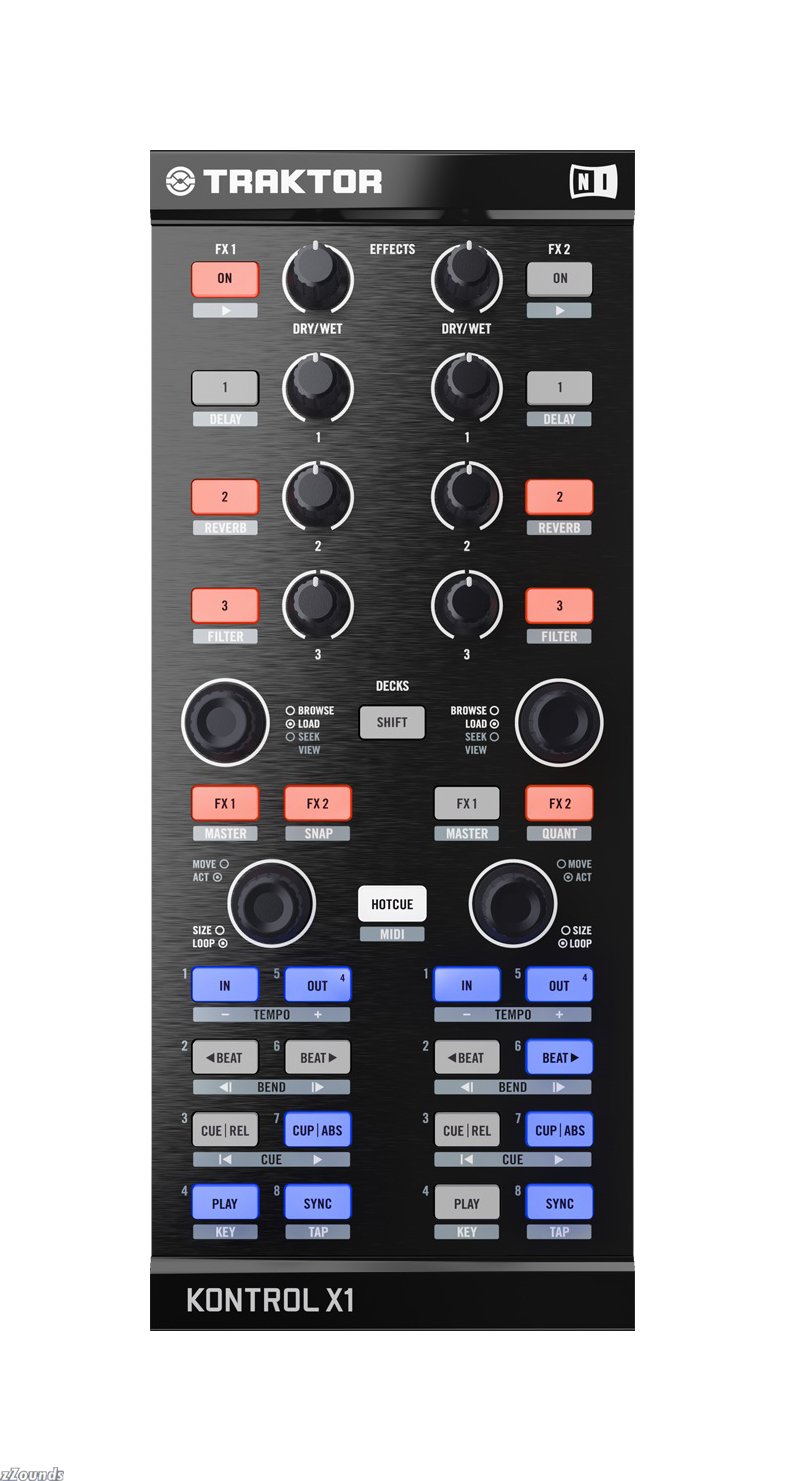
| NI Traktor Kontrol X1 | Y | Per chain: 1 dry/wet knob, 3 effect parameter knobs, 1 chain on/off button, 3 effect option buttons. Per-deck effect chain (2x) enable buttons | Good |
| Numark MIXTRACK | Y | Per-deck effect enable, effect select knob, 2x parameter knob | Perfect |
| Numark NS6 | Y | Per-deck effect selector, parameter, mix, source knobs. Effect on/off and tap buttons. | Perfect |
| Numark NS7 | N | N/A | |
| Numark NSFX | Y | Per-deck effect selector, parameter, mix, source knobs. Effect on/off and tap buttons. | Perfect |
| Numark V7 | Y | Effect selector, parameter knobs. Effect Mix fader, Effect on/off button and tap buttons | Perfect |
| Pioneer DDJ-S1 | Y | Serator ITCH style. Per-deck effect selector, parameter, mix, source knobs. Effect on/off and tap buttons. | Perfect |
| Pioneer DDJ-T1 | Y | Traktor style. 2 effects units. Per unit dry/wet, 3 parameters per unit, each with on/off buttons. Effect 1/2/3 select buttons. Advanced/Chained toggle button. Random button associated with the Dry/Wet knob. FX Unit selectors on the EQ section for FX unit 1/2 | Good |
| Reloop Digital Jockey 2 | Y | 3 effect enable/select/parameter knobs per deck | Medium |
| Reloop Digital Jockey 3 Master Edition | Y | Effect enable/select/parameter knob for 2 effects units. 4 FX enable buttons for each deck. | Medium |
| Stanton SCS.1d | Y | Four re-defineable pressable endless knobs each with LED rings, 8-char LCDs, and soft button, plus bank button and preset button section | Perfect+++ |
| Stanton SCS.1m | Y | Four re-defineable pressable endless knobs each with LED rings and 8-char LCDs, plus preset button section | Perfect++ |
| Stanton SCS.3d | Y | Three pages each with three relative or absolute touch sliders (or one jog and one slider) and four soft buttons | Perfect+ |
| Stanton SCS.3m | Y | Four touch sliders (relative or absolute) in FX mode plus four soft buttons, per deck | Perfect |
| Vestax Spin | Y | 2 FX enabled buttons?? WTF | Medium |
| Vestax Typhoon | Y | 2 wet/dry knobs + enabled buttons | Good |
| Vestax VCI-100SE DJTT Edition | Y | Wet-dry, 3-effect parameter knobs per effects unit | Medium |
| Vestax VCI-100 MK2 | Y | 2 effects units, 4 knobs per unit and 4 buttons. FX enable in the mixer section. Shift key addresses up to 4 effects units. | Good |
| Vestax VCI-300 | N | N/A | |
| Xone:DX | Y | Per-deck dry/wet, 3x parameter, knobs. Source select, on/off, tap, beats/free, and effect-select buttons. | Good |
-
Implement effect representation-
EffectManifest and its propertiesEffectManifestParameter and its properties
Effect
-
- Implement backend framework classes
-
EffectsBackend InterfaceEnumeration of EffectManifestsInstantiation of Effects
- Native Backend
- Add backend to EffectsManager
- Implement a bunch of cool effects
Port Flanger from EngineFlanger to NativeBackend- Delay / Tape Echo
- Stutter
- Backspin
- HPF / LPF
- Bitcrusher
- Gater
-
- Implement control layer
-
EffectChainControl InterfaceEffectSlot lifecycleEffect loading/unloading logicParameter sync between controls and loaded effect- Units tests for consistency of controls / state
-
EffectSlotControl InterfaceEffectSlotParameter lifecycleParameter sync between controls and loaded effect- Units tests for consistency of controls / state
-
EffectSlotParameterControl InterfaceEffect loading/unloading logicParameter sync between controls and loaded effect- Units tests for consistency of controls / state
-
-
Implement Engine representations of the control layer.TwoWayMessagePipe for sending EffectsRequest and EffectsResponse messagesEngineEffectChainEngineEffectEngineEffectParameter
- Implement overall effect management layer
-
EffectsManagerAdding, management of lifecycle of EffectsBackendsAdding, management of lifecycle of EffectChainsCheck that EffectManifest/EffectManifestParameter, Effect/EffectParameter, EffectChain/EffectSlot/EffectSlotParameter all get deleted
- Preset Management
- Implement loading/saving of EffectChain presets
- Implement next/prev logic for EffectChains
-
- Implement EffectChain parameter linking
- EffectSlotParameter's can be linked to the EffectChain's parameter
- Propagate changes in the EffectChain's parameter to EffectSlotParameters that are connected to it
-
Implement actual audio processing-
EngineEffectChain processingINSERT/SEND processingDRY/WET proportional mixingenable/disableenable/disable per groupramping gain when enabled/disabled
EngineEffect processingEngine/EngineChannel requests effect-chains enabled for a given channel as it processes themEngine/EngineChannel applies appropriate effect chains to buffers of audio that are enabled- Pre-fader vs. Post-fader processing
- EffectParameter interpolation utilities for implementing Effect processing
-
- GUI Widgets
-
EffectChain name widgetShows the name of the EffectChain that is loaded into EffectChainSlot X
- EffectChain Editor Library section
- See existing chain presets
- Create new preset
- Add/remove effect to existing chain
- Change value of parameter of effect in slot
- Right-click hover overlay for tweaking ranges, defaults.
-
This feature has been attempted twice by two GSoC students. There is a lot of old code lying around, and we will try to reuse whenever possible.
This project is active and slated for release in Mixxx 1.12.0. The code is available in the features_effects branch on rryan's github
- RJ Ryan
Fist draft by Daniel Schürmann (please edit)
It is important to merge the current merge request #180 soon, that it is included in all alpha tests.
Once it is merged we must assume that the users are starting to build skins and midi mappings. So it is required that the CO interface is somehow stable. To achieve this, we have to think ahead what might be the next steps. I have done this as confusing and sometimes wrong comments at the merge request. This is now the clean up and breakdown to steps. Step 1. is intended to be done before merge
1. Step: Ready for skinning
- Rename "EffectChain" -> "EffectUnit" This way we free the name EffectChain and are able to use it later for the whole chain. Other tools also use "EffectProcessor" for it, but this sounds more like a single Effect so lets stock with EffectUnit
- rryan: Effect unit will probably be what we describe the effect chain slots as to users so I'm fine with calling the GUI place you load effect chains into effect units.
- rryan: I am against changing the name of EffectChain to EffectUnit if that is what you are proposing. An effect unit is what you load an effect chain into (what is described in the code as an effect chain slot). An EffectChain is the user-visible name I would like to describe our effect solution as to users in Mixxx Future. They will be a user-editable thing that you can save to XML and share with friends. For Mixxx 1.12.0 we will not expose the name "Effect Chain" and will just call them effects.
- Add a second EffectRack. This seems to be common on all controllers
- rryan: An effect rack is just a grouping for the 4 effect units. As I have mentioned, I think we are mixing terminology here. Controllers commonly have 2 effect units, not 2 racks. A rack describes the group of effect units.
- rename [EffectRack1_EffectChainN],parameter to [EffectRack1_EffectUnitN],super
- rryan: OK, but we have not decided on the marketing name yet. Superknob is already used by some other software. That may be a pro for using it since users will already be familiar with the concept. Serato-style effects units on DJ controllers label this knob "parameter". Also if we generalize this into multiple parameters then it would be natural for an effect chain to have multiple super-parameters which individual effect parameters can link to.
Name of [EffectRack1_EffectUnitN],mix can be unchanged, because it is "dry/wet" in case of insert effect and "level" in case of a send effect- Add a dynamic label to "super" and "mix" like for the parameter knops. That way the name can be controlled by the "EffectUnit"
- rryan: Can you explain what this would be in practice? Is it so that a user can customize what the superknob is called? In Mixxx 1.12.0 I don't think this will be necessary.
- Merge all effect parameters to the EffectUnit. Best in a [EffectRack1_EffectUnitN],parameterN schema if possible. This way the EffectUnit has full control how the Parameters are presented in case of more than one underlying effect.
- rryan: Strongly disagree. User should have control here and this would make it impossible to know if you are connecting to the first parameter of the 2nd effect or the last parameter of the first effect. Because by convention the first parameter of an effect is the most significant, advanced users care about which parameter in particular they are connecting to. We could introduce a set of virtualized parameters for effect units that dynamically re-map to a sub-effect's parameter. This seems like unnecessary complexity when a script writer already has all they need to do this and we will not use it in our skins.
- Remove the "value" and "value_normalized" control. These two atomic values might be a source of a race condition and we have already working solution for it in Mixxx see e.g. "rate". If this does not fulfill all requirements, lets go for a general solution.
- rryan: It's true this duplicates logic that potmeter already implements but not all effects have potmeter like parameters so we can't just use ControlPotmeter. I would be for adding a custom CO that accomplishes the dynamic nature of effect parameters (the behavior changes based on the loaded effect) but as we have discussed before, you prefer that CO behavior classes do not change on the fly :P.
- rename channel_%1 to group_%1_enable
- rryan: works for me
- Make group enable a power window button
- rryan: works for me
- move group enable COs from the EffectUnit to the EffectSlot and make it a power window button.
- rryan: Disagree -- group enable should be on the effect unit level. This is how all Traktor-style and Serato-style effect units work. You can't take an individual effect in a Traktor 3-way unit and apply it to a different channel.
- Revert the removement of the filter effect. It is required for controllers with a dedicated filter knob.
- rryan: See comments in the PR. I think this should be removed.
2. Step: ready for MIDI mapping
- Allow to use both modes of a Traktor controller, this covers all models, that we have found in the wild
- Add following controls:
- rryan: In every subsequent line I think what you are describing by EffectRack1 is actually EffectRack1_EffectUnitN. As I mentioned, EffectRack1 is simply a future-proofing for when we inevitably will want multiple racks. An effect rack is simply a way to group effect units together. Where an effect unit is what you load a chain into.
- [EffectRack1],dry_wet"
- [EffectRack1],enable"
- [EffectRack1],super
    * **rryan**: I can't tell if you mean this, but if you want to add a super-super knob, a superknob that controls all the effect unit superknobs, then this is an interesting idea but not something we should have in Mixxx 1.12.0. Serato has this feature I believe.
* [EffectRack1],parameter1
* [EffectRack1],parameter2
* [EffectRack1],parameter3
* [EffectRack1],parameter4
    * **rryan**: Why just 4? Or did you mean parameterN?
    * **rryan**: Do you mean by this that an effect unit should have parameters in addition to the super knob? The super knob is like a single parameter that the unit has. If anything, I think there should be N superknobs, each of which can be linked to sub-effect's parameters.
* [EffectRack1],focus_slot
* [EffectRack1_Slot1],focus
    * **rryan**: It's too late to introduce a concept of focus. This may be a nice addition in the future but for now MIDI controllers with 2 effect units will just have to be stuck with controlling 2 of Mixxx's effect units.
* [EffectRack1_Slot1],enable
* [EffectRack1_Slot1],mix
* [EffectRack1_Slot1],super
    * **rryan**: Why does an individual effect have a superknob?
* [EffectRack1_Slot1],parameter1
* [EffectRack1_Slot1],parameter2
* [EffectRack1_Slot1],parameter3
* [EffectRack1_Slot1],parameter4
    * * **rryan**: Why just 4? Or did you mean parameterN?
rryan: I don't think I understand what you are proposing in this section. Could you elaborate? BTW a Traktor 3-way unit will not be supported in Mixxx 1.12.0 - we only have basic effects. In Mixxx Future we will support multiple effects per chain and provide a GUI widget for changing the effects in a loaded chain on the fly a-la Traktor.
3. Step: Performance tweaks
- Prevent most mallocs of group-state in the engine by pre-prepping effects with all registered groups upon instantiation.
- clean up the code similar to drawing
- rryan: The code already matches the diagram. As far as I can tell you would like a bunch of class renames:
    * EffectChainSlot -> EffectUnitSlot
    * EffectChain -> EffectUnit
    * EffectsManager -> EffectFactory
    * EffectChainManager -> EffectUnitManager
    * EngineEffectChain -> EngineEffectUnit
* Personally, I don't see the point of this busy work. EffectChain is an accurate name for what it is -- it's a chain of fully wet effects applied in order. EffectUnit is what you load an effect chain into so it doesn't make sense to rename EffectChain to EffectUnit. Beyond that, I think effect unit is just a user-facing word. I like the parallelism of EffectChain -> EffectChainSlot so I want to keep that as it aids in code readability.
* Try to replace the blocking command queue by a atomic approach
* **rryan**: The request/response FIFO is non-blocking. I commented in the PR as to why it is useful.
4. Step: New features
- load/save to XML release blocking
- Support non-numeric (e.g. enum) parameters.
- Add Deck feature collectors and provide features to effects.
- Rack serialize/deserialize buttons.
- Parameter linking. release blocking
- Add a EQ as effect
- Convert the standard Deck EQ and Filter into a effect unit. This will offer addition flexibility especially for Midi controllers without dedicated effect controls.
- rryan: see comments in the PR about this. I agree in theory -- not sure if necessary for 1.12.0.
It would be really cool if effects chains could be configured via a script file, similar to midi mappings: you can configure your controller using the options menu or with a script/xml files. This way we could pre-configure sequences of effects and many more crazy things to be controlled with few buttons or knobs, much like the wonderknob idea but not limited to it.
For example, we could get things like a delay style build-up effect controlled with a single button: when the button is pressed once, the build-up effect starts; when the button is pressed again, the input to the effect closes so the effect freezes; and finally when the effect button is pressed a third time, the input opens again with a smooth reverb effect that fades away gently.
Moreover, if the effects script could access to the song's clock, it could be automated in ordre to go through this steps according to the song's bars. So pressing the effect's button after the drop, 4 bars before the beat starts, would execute this sequence of effects just to perfectly enhance the song when the beat kicks again.
Another simpler example: maybe we want to control a complex effects combination with a wonderknob but want to have a freeze button or a specific parameter to be control independently.
I thought that a way to combine this flexibility with the skins is to have a set of "dummy" knobs with a couple of buttons under each of them (similar to the mockups above) that could pass their value/state to an effects script function. This would be the same with midi controls.
To sum up: to have the horsepower of scripting with effects in addition to this other great ideas you had.
rryan's comments: Great ideas, Lambolico. The inherent nature of scripting is that it is quite slow so there is no way it will be possible to script the actual effect processing themselves. However, when we add a generalized scripting system to Mixxx that allows you to run a script that isn't associated directly with a MIDI controller I will add an API that allows scripts to manipulate existing effect chains directly (add/remove effects, change parameters, etc.)
EffectChains and Effect parameter presets will be stored in an XML file. Beyond this we will have one-click buttons in the GUI to save and load effect chains from file. This will hopefully allow people on the forums and elsewhere to swap and trade their effect racks. If you make a YouTube video showcasing a cool effect you could provide the rack XML right there for others to try out, etc.
Effects implementations will absolutely have access to the features extracted from decks they are modifying. This means an effect implementation will know the location of beats, the BPM, the key of the track, etc.
I wonder if the industry standard way of doing this has been considered ?
http://www.ehow.com/about_6323793_fx-send-control_.html
Mixxx can have built in FX, as of course many hardware DJ mixers already have. Those hardware mixers often also have FX Send and Receive. Could Mixxx have that tied into this feature as well ? That may also allow more complex set-ups like scripting using possibly an OSC/MIDI routing to external FX units (hardware and software one's). Handing off other features to external units may allow better focus on the built in FX (Mixxx custom filters, plus plugins).
Pre and Post fader is also important as that determines if the FX just cuts off when turned off, or if it slowly fades away when turned off - as an Echo or Reverb filter will do.
rryan's comments: Great ideas, DJ Barney. The send/receive support for an external effects processor will likely come in Effects V2, not in Mixxx 1.12.0. I'm definitely keeping it in mind while building the effects infrastructure. Pre-fader / Post-fader is also on my list and will be in Effects V1.
*djbarney: ... great to hear that this is being implemented :). Is the pre/post fader available in the latest 1.12 build (26th Dec 2014) ?
Each effect shall indeed have an individual wet/dry parameter. It can be a pain to make an effects chain with a powerful effect like a reverb might be combined with a more subtle effect.
####
 This is the Mixxx Wiki -







Mixxx is a free and open-source DJ software.
Manual
Hardware Compatibility
Reporting Bugs
Getting Involved
Contribution Guidelines
Coding Guidelines
Using Git
Developer Guide
Creating Skins
Contributing Mappings
Mixxx Controls
MIDI Scripting
Components JS
HID Scripting